Color modes (themes)
Around supports Light and Dark color modes (aka themes). The user can easily switch between the color modes via theme switcher. Sometimes there is a situation when:
- You need only one mode either Light or Dark
- You need the Dark mode to be enabled by default
Let's look closer at these cases and find out how to deal with them.
Only Light mode, remove Dark mode altogether
-
Ensure that you clear the browser's local storage to remove the theme variable. In the Chrome browser, this can be done through the Application panel:

-
Remove the link to the mode-switching code from the
<head>section of your HTML document (refer to the screenshot below).
-
Remove the theme (color mode) switch markup from the
navbar(see the screenshot below).
- Remove dark mode styles by setting
$enable-dark-modevariable tofalseinsideAround/assets/scss/_variables.scss. Compiled CSS will no longer contains dark mode styles.
Only Dark mode, no Light mode option
-
Make sure to clear Browser local storage from
themevariable. In Chrome browser it can be done via Application panel:
-
Set the
data-bs-themeattribute todarkon<html>tag so the webpage loads in dark mode by default.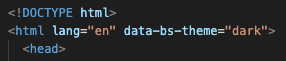
-
Remove the link to the mode-switching code from the
<head>section of your HTML document (refer to the screenshot below).
-
Remove the theme (color mode) switch markup from the
navbar(see the screenshot below).
Dark mode by default
-
Make sure to clear Browser local storage from
themevariable. In Chrome browser it can be done via Application panel:
-
Set the
data-bs-themeattribute todarkon<html>tag so the webpage loads in dark mode by default.
-
Change the theme (color mode) switch state to
checkedby default.
-
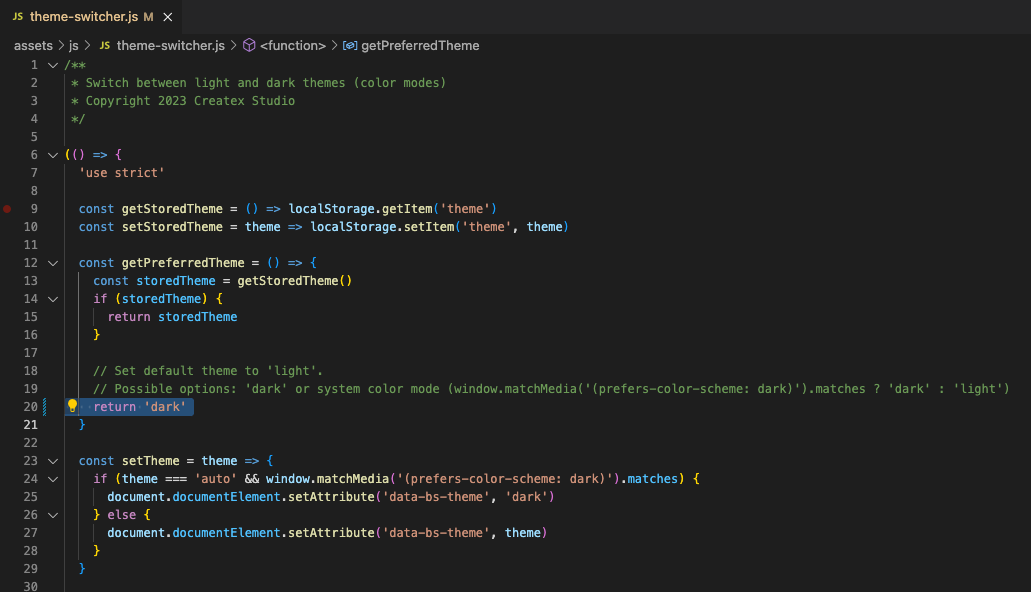
Update the code inside js file responsible for handling color mode siwtching
Around/assets/js/theme-switcher.jsto look like in the screenshot below.